NEW v26.10.2 (01) 120Hz ProMotion Ready • Universal Binary

Turn your mouse into a
power tool for macOS.

Smooth scrolling. Gestures. Shortcuts. File staging. Context-aware controls. One lightweight native app.

14-Day Full Trial · No Card Required Native for Apple Silicon & Intel No Subscription · 100% Local Processing
/ 120HZ PROMOTION DISPLAYLINK SYNC / 1:1 LINEAR HARDWARE CURSOR BYPASS / < 0.1% IDLE CPU LOAD / 1000HZ REAL-TIME POLLING METER / MAGNETIC DROP SHELF STASH / 100% LOCAL INPUT PROCESSING / 100% NATIVE SWIFT & SWIFTUI / ZERO BACKGROUND TELEMETRY BLOAT
🌊
120 Hz
ProMotion DisplayLink Sync
⚡
1000 Hz
Live Mouse Polling Meter
🎯
1:1 Raw
Linear IOKit Acceleration Bypass
🔋
< 0.1%
Lightweight Dormant Idle State

Three Superpowers Your Mouse Never Had

Beyond basic clicking and scrolling. ApexMouse introduces fluid staging, gesture drawing, and radial shortcuts right at your cursor.

🧲 Staging
01

Magnetic Drop Shelf

Drag it. Shake it. Keep it.

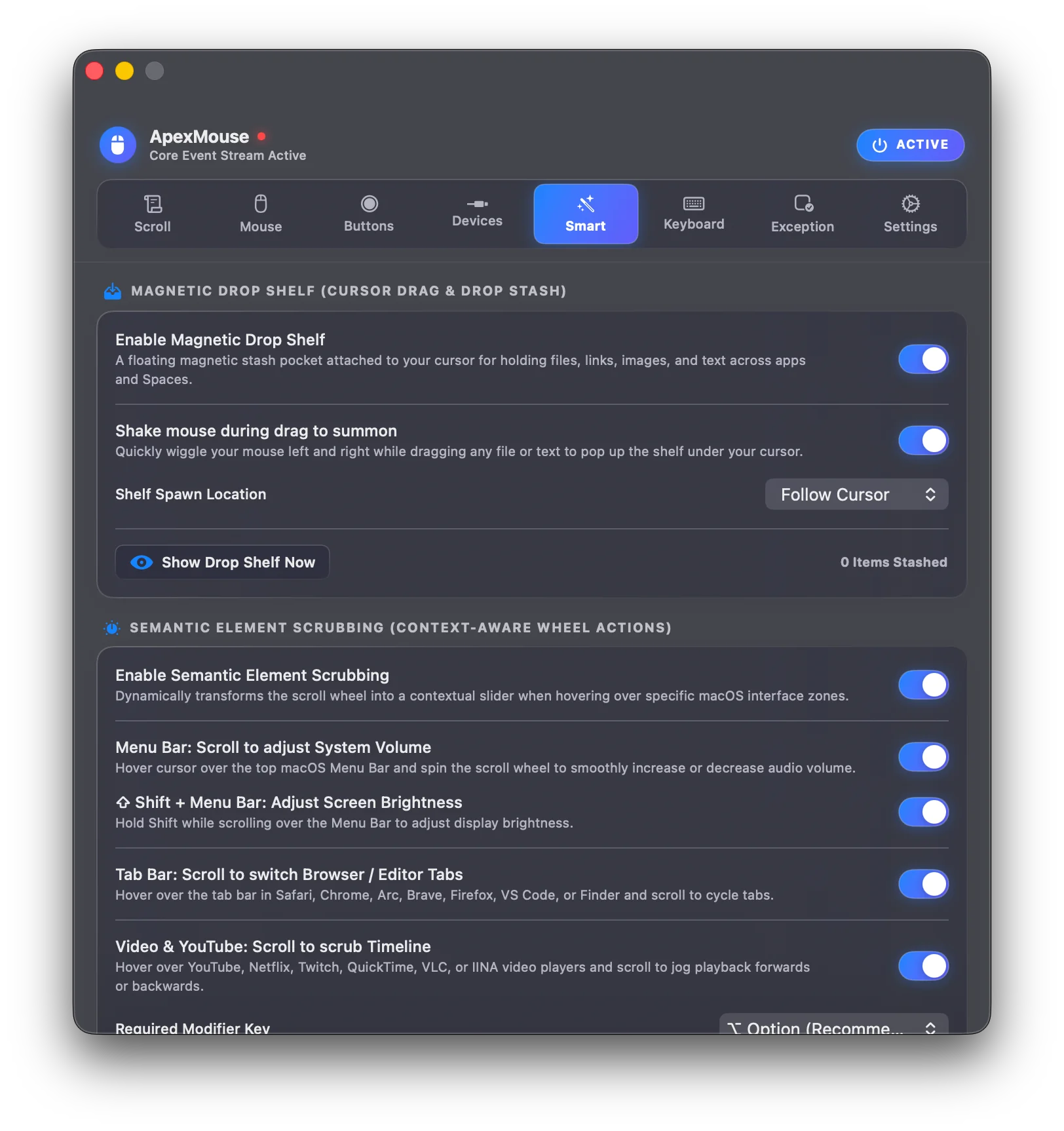
Grab files in Finder, browser images, or text snippets, give your mouse a quick shake, and stash them right under your cursor. Navigate across spaces or full-screen apps and drop them where you need them.

  • ✓ Shake-to-stage cursor shelf
  • ✓ Multi-item stack & batch drag
  • ✓ Persistent across spaces & monitors
✨ Gestures
02

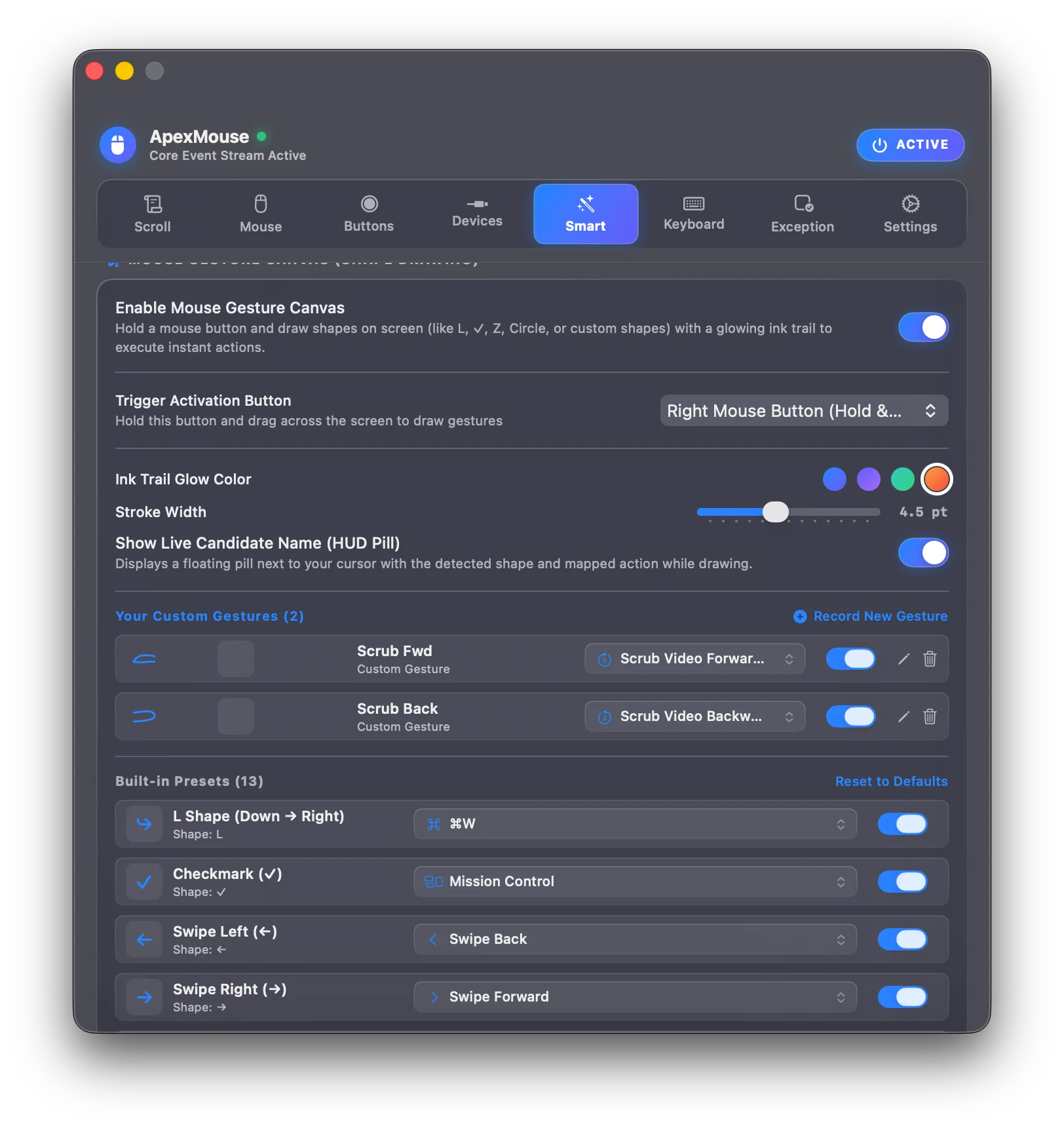
Mouse Gestures & Ink Trails

Draw shapes to execute anything.

Hold right-click or any extra button and sketch unistroke shapes anywhere on screen. Trigger Mission Control, switch spaces, close tabs, or run custom keyboard macros with fluid glowing ink trails.

  • ✓ Glowing neon ink trail feedback
  • ✓ $1 unistroke geometric recognizer
  • ✓ Per-app custom gesture mappings
🎯 Radial Dial
03

8-Way Radial Action Dial

An ergonomic palette at your pointer.

Summon an 8-direction circular menu directly around your cursor with a single click or chord. Flick toward any slice for instant media controls, window snapping, navigation, and shortcuts with zero pointer travel.

  • ✓ Instant 0ms cursor-centric popup
  • ✓ 8 directional slice triggers
  • ✓ Flick-to-execute muscle memory

Three Ways ApexMouse Transforms Your Mac Experience

Replacing fragmented single-purpose utilities with a unified, lightweight, native macOS input layer.

Outcome 01
🌊

Make your mouse feel better

Make your mouse feel the way you expect it to. Smooth scrolling, predictable cursor movement and live hardware feedback synchronized to your Mac's screen.

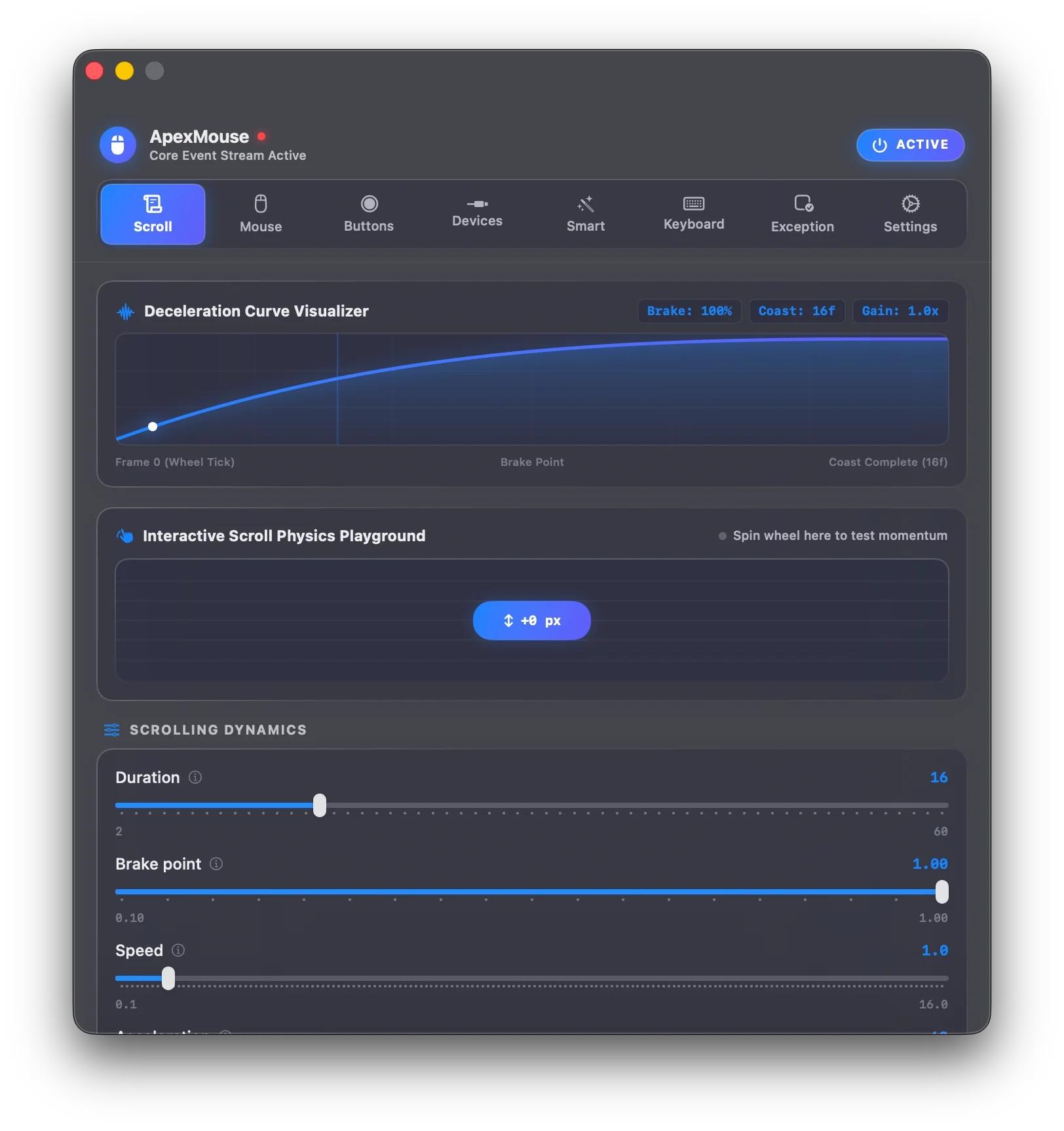
  • ✓ 120Hz ProMotion Smooth Scrolling: Converts jerky wheel notches into continuous, momentum-based sub-pixel animation via CVDisplayLink.
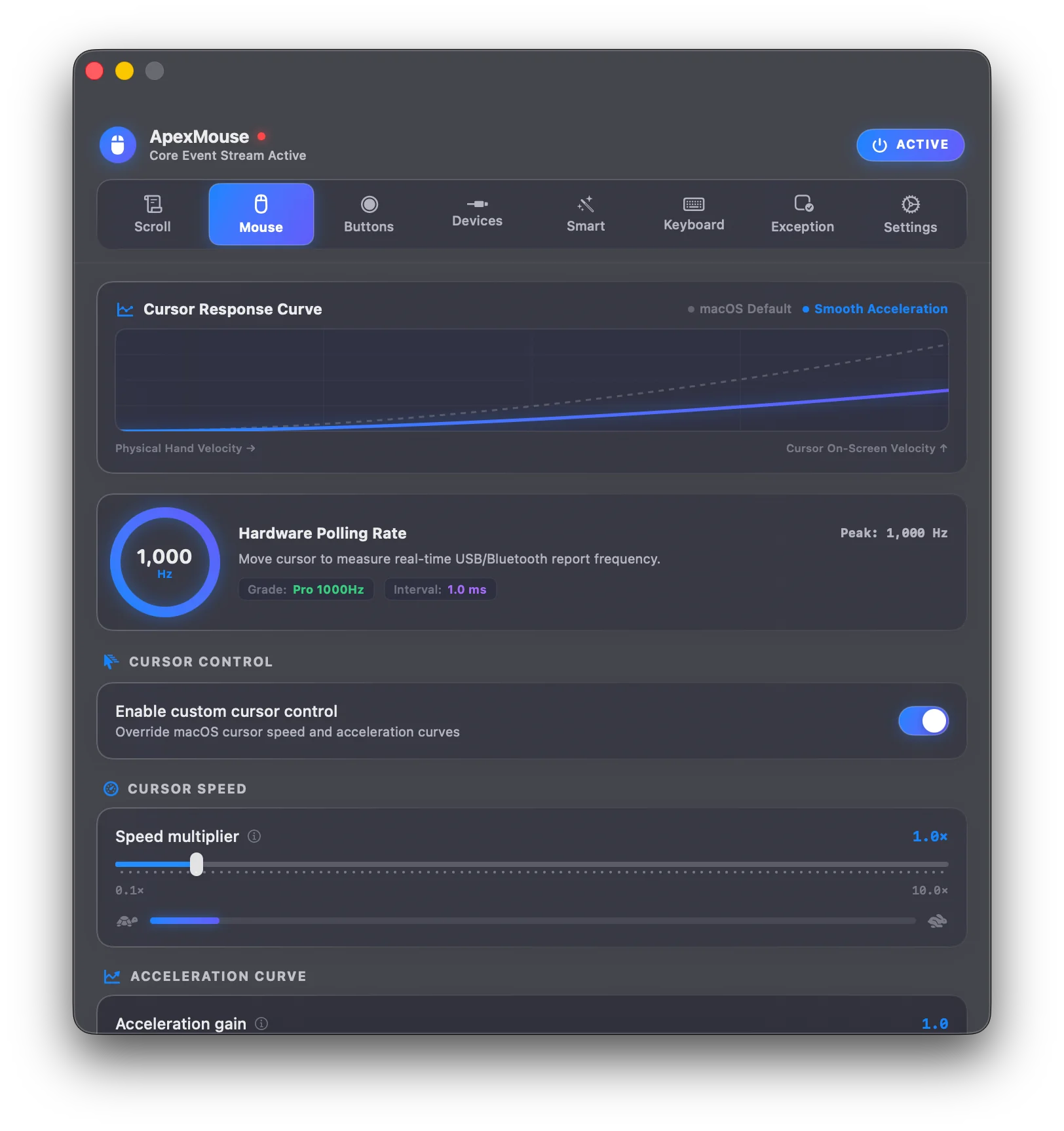
  • ✓ 1:1 Linear Acceleration Bypass: Overrides macOS curve distortion for true 1:1 hardware tracking in games and design work.
  • ✓ 125Hz–1,000Hz Live Telemetry: In-app hardware gauge verifies actual USB and Bluetooth report rates on macOS.
Outcome 02
⚡

Make your mouse do more

Turn mouse movements into actions. Launch apps, switch spaces, trigger shortcuts and control your Mac without reaching for the keyboard.

  • ✓ Mouse Gesture Canvas: Draw fluid shapes with glowing ink trails anywhere on screen to execute 30+ native macOS actions.
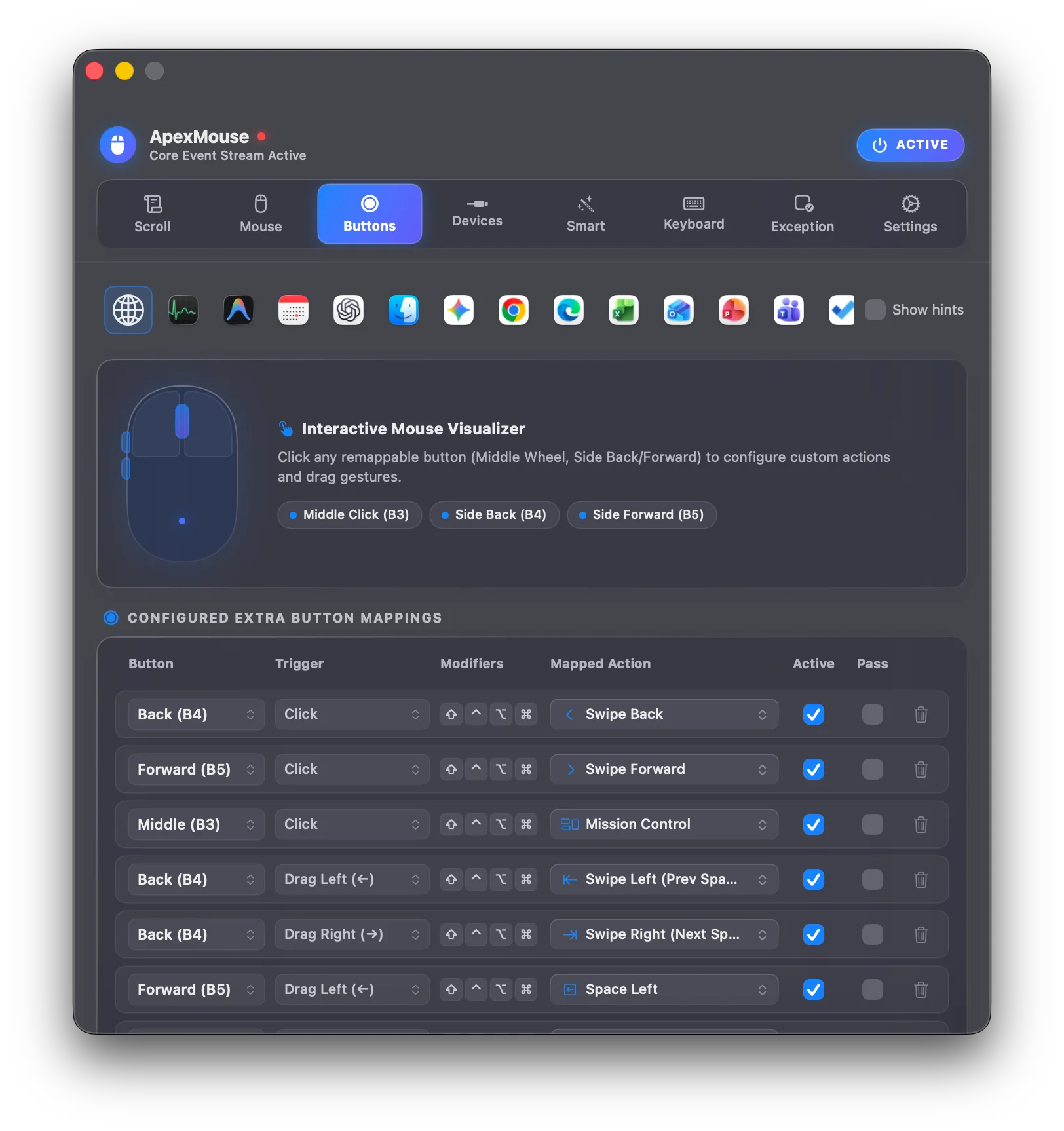
  • ✓ 4-Way Directional Drag Gestures: Hold an extra button and flick left, right, up, or down to navigate spaces and Mission Control.
  • ✓ Radial Action Dial: Tap a thumb button to summon a clean 8-way circular menu centered directly around your cursor.
Outcome 03
🧲

Make your mouse work differently

ApexMouse adapts your mouse to what you're doing instead of forcing every app to behave the same way.

  • ✓ Magnetic Drop Shelf: Hold files and web snippets at your cursor, eliminating desktop clutter and repetitive copy-pasting.
  • ✓ Context-Aware Scrolling: Automatically zoom in web browsers, scrub timelines in Final Cut, and pan in Figma.
  • ✓ Per-App Behavior Profiles: Customize distinct button actions and wheel orientations per application.

Watch It in Action

Five quick demonstrations of how ApexMouse streamlines everyday macOS interactions.

Staging Magnetic Drop Shelf & Smart Features Settings

1. Smart Features & Drop Shelf

Shake your mouse to stage files, toggle clipboard monitoring, and calibrate sensitivity in settings.

Gestures Mouse Gesture Canvas & Stroke Recognition

2. Gestures & Ink Trails

Draw glowing shapes on screen to trigger macOS system actions, spaces, and window shortcuts.

Radial Dial Radial Menu & Button Mapping Configuration

3. Radial Dial & Button Chords

Configure the 8-slice circular menu and bind mouse buttons to actions or chord combinations.

Smart Wheel Context-Aware Scrolling Demonstration

4. Context-Aware Scrolling

Automatically zoom canvas views in creative apps and scrub video timelines without modifier keys.

Precision Smooth Scrolling and Cursor Control Demonstration

5. Smooth Scrolling & 1:1 Tracking

Glide through long web pages with 120Hz display refresh momentum and raw linear hardware cursor bypass.

What mouse do you use?

ApexMouse replaces bloated vendor daemons and unlocks hardware capabilities across all major brands.

Logitech on macOS

Full Hardware Capability
Supported Models: MX Master 3S, MX Anywhere 3, G502 HERO, G Pro X Superlight, Lift Vertical, Pebble
  • ✓ Replaces heavy 500MB Logitech G HUB and Logi Options+ background daemons with a native Swift engine.
  • ✓ Unlocks MX Master thumb wheel horizontal smooth scrolling, gesture button, and multi-trigger combinations.
  • ✓ Supports 120Hz ProMotion CVDisplayLink momentum scrolling across both ratchet and free-spin wheels.
  • ✓ Custom button chording: hold side button + spin wheel for instant volume control or desktop zooming.

Simple, Honest Pricing

Try 100% free for 14 days with zero restrictions. When you love it, own it for life with no recurring monthly subscriptions.

14-Day Free Trial

Experience every single capability with zero restrictions and no credit card required.

£ 0
/ 14 days
100% Free
Start 14-Day Trial
What's Included:
  • All Pro features completely unlocked
  • 120Hz ProMotion CVDisplayLink physics
  • 1:1 Linear mouse acceleration bypass
  • No account needed — instant evaluation
  • Retains basic smooth scrolling forever

Power Bundle

For professionals with multi-Mac setups or households sharing up to 5 Macs.

£ 19.99
one-time + taxes
£39.99 50% off
Get 5-Mac Bundle
Everything in Pro, Plus:
  • Up to 5 Macs simultaneously
  • Shared profile JSON backups
  • Priority support assistance
  • All Pro features on every Mac
🛡️

14-Day Money Back Guarantee

If ApexMouse doesn't make your Mac feel noticeably smoother and more capable, contact us within 14 days for a full refund. Read policy →

Already using another Mac mouse utility?

ApexMouse combines everyday mouse controls with advanced gestures, contextual actions, file staging and per-app behaviour in one native macOS app.

Feature Capability
Featured ApexMouse
Stock macOS BetterMouse Mac Mouse Fix LinearMouse
120Hz ProMotion Smooth Scrolling Continuous CVDisplayLink sub-pixel wheel physics ✓ CVDisplayLink 120Hz ✕ 3-Line Step ✓ Yes ✓ Yes Partial
1:1 Linear Acceleration Bypass Direct IOKit parameter tuning to kill macOS forced curve ✓ Native IOKit ✕ Forced Curve ✓ Yes ✕ No ✓ Yes
Magnetic Drop Shelf (Shake to Stash) Floating cursor pocket to stash files, links & text anywhere ✓ Built-in Stash ✕ None ✕ None ✕ None ✕ None
Unistroke Mouse Gestures & Ink Trails 13 geometric shapes with customizable gesture studio ✓ 13 Presets + Ink ✕ None Drag only Drag only ✕ None
8-Way Radial Action Dial Instant HUD circular action dial under cursor ✓ HUD Radial Dial ✕ None ✕ None ✕ None ✕ None
Context Menu Bar & Dock Scrubbing Hover menu bar or Dock to scrub volume, brightness & spaces ✓ Hover Wheel Scrub ✕ None ✕ None ✕ None ✕ None
Scroll-to-Raise Background Windows Elevates background app window under cursor on wheel motion ✓ Instant Raise ✕ None ✓ Basic Raise ✕ None ✕ None
Per-App Profiles & Exceptions Independent scroll physics and mappings per application ✓ Auto-Switching ✕ None ✓ Yes ✕ Global Only ✕ Global Only
Trackpad & Magic Mouse Auto-Bypass Native multi-touch gestures pass through untouched without jitter ✓ Zero-Interference ✓ Native ✓ Yes Desync Risk Manual Toggle
Live 125Hz–1,000Hz Polling Meter Real-time hardware report rate & FPS frequency gauge ✓ Real-time Gauge ✕ None ✕ None ✕ None ✕ None
Pricing & Mac Seats One-time purchase license with multi-Mac support
£9.99 Lifetime 2 Personal Macs
Free (Built-in) $5.99 (1 Mac) $2.99 / Free v2 Free (Open Source)

Built properly for macOS.

Engineered from scratch in modern Swift for maximum responsiveness and minimal resource impact.

⚡

Native Swift 5.10 & SwiftUI

Compiled directly to ARM64 and x86_64 machine code with modern Swift state observation. Zero Electron or web-wrapper bloat.

🍏

Universal 2 Binary

Runs natively on Apple Silicon (M1, M2, M3, M4) and Intel Macs without translation overhead.

⏱️

CVDisplayLink Synchronization

Sub-pixel scroll physics are synchronized with your Mac's screen refresh rate (60Hz or 120Hz ProMotion).

🔌

Direct IOKit HID Integration

Communicates straight to the USB and Bluetooth human-interface bus for sub-millisecond click response.

🛡️

Apple Signed & Notarized

Code-signed with an official Apple Developer ID and notarized by Apple Gatekeeper for clean, warning-free installs.

🔋

Dormant Idle Engine

Event taps consume virtually zero CPU cycles when your mouse is stationary, keeping battery consumption negligible.

Your mouse data stays on your Mac.

Input utilities require macOS Accessibility permissions. We treat your privacy as non-negotiable.

🔒

100% Local Event Tap

All clicks, scrolls, and gestures are processed in-memory and immediately discarded. Nothing is logged to disk.

🚫

Zero Cloud Mouse Streams

Coordinates, clicks, gestures, and active app titles are never transmitted over the internet.

👤

No Account Required

Download, test the full 14-day trial, and activate your license without creating an account or providing an email in-app.

🛡️

Anonymous Support ID

Customer assistance utilizes an anonymous code (APEX-XXXX-XXXX) with zero personally identifiable data. Read policy →

Built for people who actually use their mouse.

Tailored workflows for Mac creators, engineers, and power users.

💻

Developers

VS Code • Xcode • Terminal • Browser

Switch desktop spaces with 4-way button drags, trigger split-screen terminal layouts, and jump between code tabs.

🎨

Designers

Figma • Sketch • Photoshop • Illustrator

Sub-pixel precision 1:1 panning, smooth deceleration curves for infinite canvases, and quick tool switching.

🚀

Power Users

Multi-Monitor • Window Management

8-way cursor radial action menus, unistroke gestures, and Drop Shelf file staging across multi-display setups.

🖱️

Mouse Enthusiasts

Logitech • Razer • Keychron • Pulsar

Real-time 1000Hz polling rate monitoring, custom acceleration curves, and full multi-button mapping without vendor bloatware.

Less friction. More flow.

Compare the everyday friction of stock macOS mouse interaction with ApexMouse.

✕ Your mouse today

Click target → reach for keyboard shortcut → switch desktop space → open Finder window → drag file across multiple screens → switch back → paste.

✓ With ApexMouse

Gesture anywhere → instant system action → shake mouse to stash in Drop Shelf at cursor → navigate anywhere → drop directly into target.

Get ApexMouse Today

Native for Apple Silicon (M1/M2/M3/M4) and Intel Macs running macOS Sonoma (14), Sequoia (15), Tahoe (26), or Golden Gate (27+).

📦

Apple Disk Image (.DMG)

Recommended • 5.2 MB • Drag & Drop Installer

Standard macOS drag-and-drop installer. Open the downloaded the DMG and drag ApexMouse directly into your Applications folder.

Download .DMGApple Silicon & Intel • Recommended
🗜️

Direct ZIP Archive

Direct App Bundle • 4.4 MB

Standalone `.zip` archive containing the uncompressed `ApexMouse.app` bundle ready to drop into `~/Applications`.

Universal .ZIPApple Silicon & Intel • Direct Bundle

Quick 3-Step Setup Guide

1

Drag to Applications

Open the downloaded `ApexMouse.dmg` and drag `ApexMouse.app` into `/Applications` or launch directly.

2

Grant Accessibility

ApexMouse will prompt to enable Accessibility in System Settings → Privacy & Security to smooth scroll events.

3

Enjoy Butter Velocity

Spin your scroll wheel, tune your physics curve in the menu bar dropdown, and customise buttons.

Apple Developer ID Signed & Notarized • Seamless First Launch

Version History & Release Notes

Track all improvements, performance optimisations, and updates. Built with CalVer calendar versioning.

v26.10.2 (01) Archive
October 02, 2026
  • Feature Menu Bar Customization: Option in Settings to show or hide the menu bar icon.
  • Feature Diagnostic Tools: One-click Diagnostic Report export in Settings for faster support assistance.
  • Improvement Radial Menu Visuals: Enhanced slice selection styling with clean translucent glass highlight.
  • Fix Stability & Performance: Reliability optimizations and concurrency improvements across macOS Sonoma and Sequoia.
v26.9.29 (01) Archive
September 29, 2026
  • Feature In-App Update Highlights: Added structured release summaries with categorized feature breakdowns.
  • Improvement Streamlined Permissions: Improved first-launch accessibility permission detection with guided setup.
v26.9.28 (02) Archive
September 28, 2026
  • Feature Anonymous Error Reporting: Opt-in error reporting to help identify and fix issues faster.
  • Feature Privacy Settings: New toggle in Settings to opt out of error reporting.
v26.9.27 (03) Archive
September 27, 2026
  • Security Developer ID Signing: Enabled Apple Developer ID code signing and notarization for trusted downloads.

Support, Guides & Tip Jar

Accessibility permission setup, Apple notarization security, self-service license recovery, and indie developer tips.

🛡️

Apple Signed & Notarized

Verified by Apple

ApexMouse is officially code-signed with a certified Apple Developer ID and fully notarized by Apple's automated security verification service:

1
Automatic Gatekeeper Approval: When you open ApexMouse, macOS automatically verifies Apple's stapled security ticket. No terminal commands or right-click overrides are needed.
2
Malware-Free Guarantee: Apple's notarization service scans every binary release prior to distribution to ensure it is free from malicious code or unwanted software.
3
Non-Sandboxed Input Engine: ApexMouse operates with standard user privileges to control low-level mouse deceleration and Extra Buttons without requiring kernel extensions (kexts).
⚙️

Accessibility Permission Repair

System Input Privilege

ApexMouse uses a native macOS event tap to smooth scroll momentum and detect extra mouse buttons. It collects zero keystrokes, zero mouse coordinates, and zero private data.

1
Initial Setup: Open System Settings → Privacy & Security → Accessibility and ensure ApexMouse is switched ON.
2
Fix Permission Desync: If scrolling or buttons stop responding after a macOS update, toggle ApexMouse OFF, wait 2 seconds, and toggle it back ON. If needed, select it, click - (Remove), and re-add with +.
3
Reset TCC via Terminal: If macOS permissions remain stuck, reset the accessibility database:
tccutil reset Accessibility com.apexmouse.macos
🔑

License Recovery & Transfers

Instant Self-Service

Lost your license key, or migrating to a new Mac? Look up your purchases immediately through our merchant of record, Gumroad, without waiting for email replies.

✦
Customer Order Portal: Enter your checkout email to retrieve license keys, download receipts, and view active machines.
✦
Multi-Device Coverage: Standard Lifetime licenses cover up to 2 personal Macs concurrently. The 5-Mac Bundle covers up to 5 Macs.
✦
Migrating to a New Mac: Deactivate your key in ApexMouse Settings on the old Mac, or activate directly on the new Mac.
⚡ Direct Engineering Desk

Contact Support, Suggest Features & Report Bugs

Need help with an activation reset, want to report an issue, or have a brilliant feature suggestion for ApexMouse? Submit your message below and our lead engineer will respond directly to your email.

Direct engineering inbox:

Frequently Asked Questions

Everything you need to know about compatibility, permissions, security, and licensing.

ApexMouse is a 100% native macOS software utility application (.dmg installer), NOT a physical computer mouse.

You do not buy a physical mouse device from us. Instead, you download and install the ApexMouse software application on your Mac (MacBook Pro/Air, Mac mini, Mac Studio, or iMac) to control and dramatically upgrade the physical USB or Bluetooth mouse you already own (including Logitech MX Master 3S, Razer DeathAdder, SteelSeries, Keychron, or Apple Magic Mouse). ApexMouse is an independent macOS software application and is not affiliated with the ALOGIC Apex Bluetooth mouse or any physical hardware peripheral.

ApexMouse is an all-in-one native Swift utility combining 120Hz ProMotion CVDisplayLink smooth scrolling, 1:1 hardware cursor acceleration bypass, a live 1000Hz polling rate meter, a magnetic Drop Shelf for file staging, semantic element scrubbing, and a radial dial menu. Unlike Mos or LinearMouse which only handle basic scrolling or acceleration, or BetterMouse which lacks integrated shelf staging and live telemetry, ApexMouse delivers full-spectrum mouse optimization with virtually zero idle CPU usage.

Yes, absolutely. Many Mac users suffer from high battery drain and choppy scrolling caused by bulky 500MB+ vendor software suites like Logitech G HUB, Logi Options+, or Razer Synapse. ApexMouse natively handles Logitech (MX Master 3S, G502, G Pro X), Razer, SteelSeries, Keychron, and Apple mice directly at the macOS IOKit level. You get buttery-smooth momentum, customizable side button remapping, and independent X/Y DPI calibration with under 0.1% CPU usage and zero background daemons.

Yes, completely. ApexMouse is signed with an official Apple Developer ID certificate and fully notarized by Apple's security servers. When you open ApexMouse for the first time, macOS Gatekeeper verifies its cryptographic signature and checks that Apple scanned the binary for malicious software. You will see Apple's trusted verification dialog and can launch the app immediately without terminal commands or security overrides.

When macOS undergoes major system updates (e.g. updating to Sequoia, Tahoe, or Golden Gate), Apple's TCC permissions database occasionally desynchronizes app binary signatures. To resolve this:

  1. Open System Settings → Privacy & Security → Accessibility.
  2. Toggle ApexMouse OFF, wait 2 seconds, and toggle it back ON.
  3. If the issue persists, select ApexMouse, click the - (Remove) button, then click + and re-add /Applications/ApexMouse.app.
  4. Alternatively, reset TCC permissions directly via Terminal:
tccutil reset Accessibility com.apexmouse.macos

You can look up all your license keys and receipts at any time without waiting for support:

  • Visit your Gumroad Customer Library ↗ to view your receipt, download links, and license keys.
  • A single Standard Lifetime license allows concurrent activation on up to 2 personal Macs (and Power Bundle on up to 5 Macs). If you reinstall or need help, submit a request via our Support Form or contact support@apexmouse.tech for an immediate reset.

No! ApexMouse uses real-time IOKit HID device telemetry to isolate built-in and Magic Trackpads. Native Apple multi-touch gestures, fluid pinch-to-zoom, and natural inertia are passed through 100% untouched. External USB/Bluetooth mice get butter-smooth momentum without affecting your trackpad.

macOS requires Accessibility authorisation for utilities that modify mouse input. This allows ApexMouse to intercept mouse wheel events to apply fluid scrolling momentum, and detect extra mouse buttons for quick actions. ApexMouse requires only this standard permission to function.

Virtually zero. ApexMouse is engineered in 100% native Swift 5.10+ and SwiftUI with zero Electron or WebKit bloat. The display link only ticks when active scrolling occurs and goes completely dormant within milliseconds, consuming virtually 0.0% CPU at idle with zero battery impact.

Yes. ApexMouse is 100% native on both Apple Silicon (M1, M2, M3, M4) and Intel Macs. It runs with zero translation layer or Rosetta emulation, delivering maximum responsiveness and zero battery drain.

ApexMouse processes all mouse events and gestures 100% locally on your Mac — it never logs keystrokes, cursor positions, or visited apps. A brief internet connection is only needed to activate your license key and re-validate every few days (with a 15-day offline grace period), or to send optional crash diagnostics which you can disable in Settings.

The Tip Jar (via Buy Me a Coffee, GitHub Sponsors, or PayPal) is completely voluntary. ApexMouse is built with pride by an independent developer and contains zero ads, zero tracking scripts, and zero investor pressure. Tips directly fund purchases of specialized test mice, high-refresh displays, and continuous software maintenance for every upcoming macOS release.

📋 Copied to clipboard!